Over 70% of ADHD and autistic adults report daily burnout from workplace productivity tools. The problem is not a lack of discipline. It is that most apps are designed for neurotypical brains — brains that linearize tasks, maintain streaks, and respond to gamified pressure. Neurodivergent brains do not work that way. And that is not a bug. It is a different operating system.
We reviewed the note-taking and knowledge management tools that explicitly serve neurodivergent adults. Here is what we found.
What neurodivergent brains need
Before the tool list, the criteria. A good note-taking app for neurodivergent adults should:
- Lower executive function tax — Capture must be instant. No menus, no folders, no decisions before the thought is saved.
- No streaks or guilt mechanics — Streaks weaponize inconsistency. For ADHD brains, a broken streak is a reason to abandon the tool entirely.
- Respect sensory needs — Reduced motion, quiet defaults, no auto-playing media, no red notification badges.
- Tolerate non-linear workflows — Notes should not require categories, hierarchies, or consistent tagging to be findable.
- Use plain language — No jargon, no hidden settings, no "discoverability" puzzles.
1. Glassy
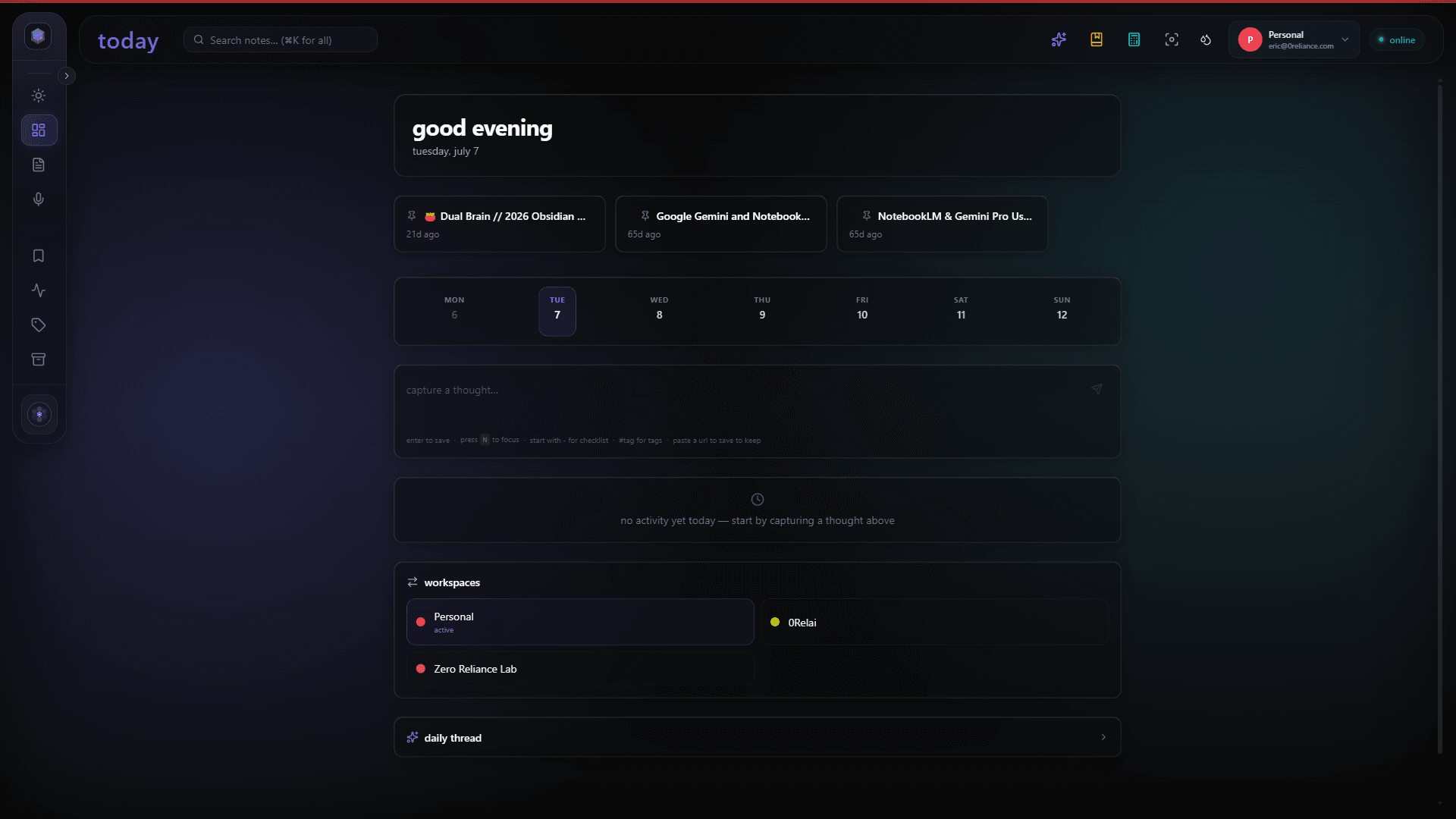
We built Glassy, so we will be transparent about that. But we built it because the alternatives failed us. Glassy was designed from the first commit for nonlinear brains. Read our full neurodiversity design philosophy for the deeper reasoning behind these choices:
- Capture-first inbox — One shortcut saves anything. No folder prompt, no tag required. AI auto-tags on its own time.
- No streaks, no badges, no nudges — The app does not shame you for not using it.
- Reduced motion by default — Animations are opt-in, not opt-out.
- Semantic search — Find notes by meaning, not by remembering the exact tag or folder you used six months ago.
- Local AI — Transcription, summarization, and tagging run on your device. No cloud anxiety about sensitive content.
- Focus mode — Collapse everything except the note you are writing. No sidebar, no counts, no pressure.
Best for: People who want a knowledge workspace that adapts to their brain, not the other way around. Especially strong for ADHD and autistic users who need low-friction capture and non-punitive design.
2. Rivva
Rivva is an AI assistant that handles executive function — planning, scheduling, rescheduling. Their approach is to offload the planning layer entirely, which is genuinely useful for ADHD brains that struggle with task initiation and prioritization. Nia, their AI assistant, decides what to work on and when.
Best for: Professionals who need help with the planning and scheduling layer, not just note capture. The AI-driven executive function offload is a real differentiator.
Limitations: Rivva is cloud-based, which may be a concern for privacy-sensitive users. It is also more of a task manager than a knowledge base — your notes live inside tasks, not as a searchable corpus.
3. Saner.ai
Saner.ai positions itself as a neurodivergent-friendly productivity tool with AI summaries and task extraction. It focuses on reducing overwhelm by summarizing long content and breaking tasks into smaller steps.
Best for: Users who primarily need help processing and summarizing incoming information. Good for content-heavy workflows.
Limitations: Cloud-only, no local AI option. The knowledge base is not exposed via MCP or any agent protocol, so you cannot query it from Claude, Cursor, Windsurf, OpenCode, Hermes, Openclaw, Pi, or any MCP-compatible AI agent.
4. Obsidian
Obsidian is not designed specifically for neurodivergent users, but its local-first, plain-Markdown approach resonates with many autistic users who want full control over their data and file structure. The plugin landscape is vast, which is both a strength and a source of overwhelm.
Best for: Users who want maximum control and are comfortable with technical setup. The community is excellent and neurodivergent-friendly.
Limitations: High setup tax. The plugin marketplace is a paradox of choice. No built-in AI, no built-in capture from the browser. Glassy solves this by proxying Obsidian vaults and adding the missing layers.
5. Notion
Notion is the default at many companies. Its block-based editor is flexible, and the database views can work well for visual thinkers. But Notion's cloud-only model, heavy interface, and notification system are frequent pain points for neurodivergent users.
Best for: Team collaboration where Notion is already the standard. Not recommended as a personal knowledge base for sensory-sensitive users.
Comparison at a glance
| Tool | Local AI | No streaks | MCP / Agent | Capture |
|---|---|---|---|---|
| Glassy | Yes | Yes | Yes | Browser + voice |
| Rivva | No | Yes | No | Manual |
| Saner.ai | No | Yes | No | Manual |
| Obsidian | Via plugins | Yes | Community | Manual |
| Notion | No | No | Official | Web clipper |
The bottom line
The best tool for a neurodivergent brain is the one that lowers friction, not the one that adds features. Capture should be instant. Search should be semantic. The interface should be quiet. And the app should never, ever make you feel guilty for not opening it yesterday.
We built Glassy because we needed it. If it sounds like it might work for your brain too, try it free.