Glassy Capture
Your capture co-pilot.
Save bookmarks, structured captures, highlights, and AI summaries from any page — without leaving your flow.
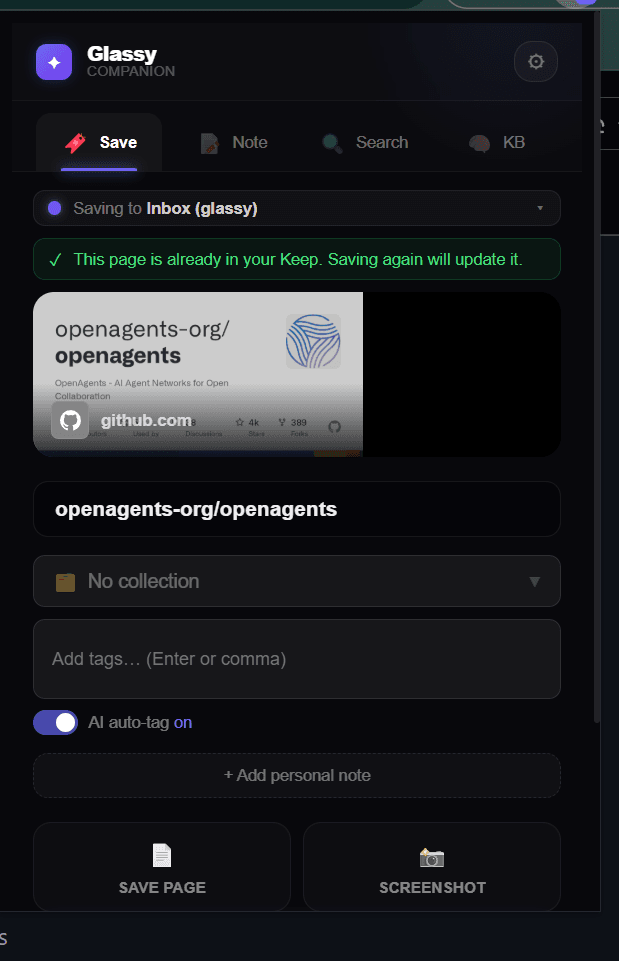
Screenshot: Extension save popup
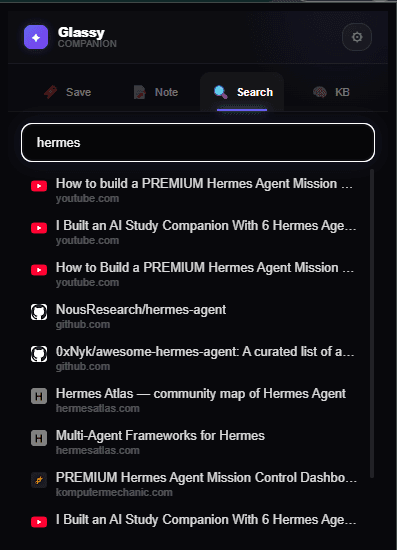
Screenshot: KB Search tab
Chrome / Edge / Opera
Extract the folder, then load as unpacked extension.
Firefox 121+
Install from file in about:addons.
Getting started
⬇️ Download
Get the .zip (Chromium) or .xpi (Firefox) for your browser.
📦 Extract
Unzip the folder anywhere on your computer (Chromium only).
🔧 Load
Open your browser's extensions page, enable Developer mode, and load the unpacked folder (Chromium) or install the .xpi (Firefox).
🔑 Sign in
Click the Glassy icon in your toolbar and sign in with your Glassy account.
Installation details
Chrome / Edge / Opera
- 1 Download the .zip from GitHub and extract it.
- 2 Open
chrome://extensions(oredge://extensions/opera://extensions). - 3 Enable Developer mode (top-right toggle).
- 4 Click Load unpacked and select the extracted folder.
Firefox 121+
- 1 Download the .xpi file from the button above.
- 2 Open
about:addons(or ☰ → Add-ons and themes). - 3 Click the gear icon → Install Add-on From File → select the .xpi.
- 4 Done. The extension auto-updates when new versions are released.
Features
1-click save
Save any page to your Glassy library instantly.
Unified Save Card (v2.12)
A single progressive-disclosure card merging Quick + Smart Save. Type chips (Article, Video, Repo, Bookmark) re-run the page interpreter on change so metadata is always fresh before save.
AI auto-tag
Smart tags from your AI provider. Toggle per save.
Element Picker
Hover to highlight any element, click to capture as Markdown.
Screenshots
Capture the visible viewport as PNG attached to your save. Routes directly through the service worker — works on restricted URLs and PDFs.
Site Interpreters
Auto-enriched metadata for YouTube, GitHub, products, articles.
Highlights
Select text on any page → right-click → "Highlight selection in Glassy".
KB Search (v2.10)
Search your Glassy knowledge base (bookmarks, notes, vault files) from the popup. Source filter tabs, debounced hybrid search, relevance scores.
MCP Bridge (v2.11)
Settings → Integrations shows copy-pasteable snippets for Claude, Cursor, Windsurf, OpenCode, Hermes, Openclaw, Pi, and any MCP-compatible client. Pairs with the Glassy MCP server on self-hosted instances (42 tools on the appliance, named per-agent keys, agent memory, 4 prompts, 9 resources).
Obsidian Bridge (v2.12)
Proxy Obsidian Local REST API requests on behalf of the Glassy server — solves WSL2/Docker networking so the server can reach Obsidian on 127.0.0.1:27124. Also pushes captures to the vault as markdown files with YAML frontmatter.
Vault Companion (v2.15)
Browse your Obsidian vault inside the extension popup: read notes with backlinks and tags, append to your daily note (Shift+Enter), create new notes pushed to the vault, and find related vault content when saving a bookmark. Merge vault + Glassy tags in autocomplete with source badges.
Offline queue
Saves queue locally and sync when you reconnect. Storage quota monitoring keeps the queue healthy.
Ready to start saving?
The extension is free. Bookmarks sync to your Glassy workspace on the Free tier. GlassyKeep, Smart Collections, and AI auto-tag are included in every account — Free too.
Glassy Capture
Keep the page, not the tab.
Save a bookmark, a structured capture, a highlight, or an AI summary from any page. The extension detects your browser and walks you through the install.